
Billdr vs monday.com: Which Is Right for General Contractors?
monday.com is one of the most popular work management platforms in the world. Founded in 2012 in Tel Aviv, it serves over 225,000 organizations across marketing, product, HR, IT, sales, and operations. Its visual boards, automations, and flexibility make it genuinely useful for a wide range of team coordination tasks.
General contractors discover monday.com the same way they discover spreadsheets: it is familiar, accessible, and flexible enough to be bent into any shape you need. A GC can build a project tracker in monday.com. They can create a timeline for a renovation. They can assign tasks to subcontractors and track completion. It works, up to a point.
The point where it stops working is the moment you need construction-specific workflows: multi-line scope-of-work estimating, formal change order tracking, daily field logs with automatic client sharing, and milestone-based invoicing. These are not tasks that monday.com boards handle natively. They are tasks that Billdr was built for.
Full disclosure: we build Billdr. monday.com pricing shown in CAD, billed annually, verified at monday.com as of July 2026. monday.com uses bucket seat pricing (minimum 3 seats, then increments of 5), so figures shown are approximations for the team size indicated. Actual cost depends on exact seat count and plan. Billdr Core OS pricing is published at billdr.ai.
What Is monday.com and Who Uses It?
monday.com is a work operating system used by teams across marketing, product, IT, HR, sales, and operations to manage projects, tasks, and workflows visually. It is not construction software. It does not have construction estimating, change order management, daily logs, subcontractor coordination, milestone invoicing, or a construction AI team. It has templates for construction project tracking, but these are generic project boards, not purpose-built construction management tools. monday.com is often adopted by early-stage GCs out of familiarity with tools like Excel and Asana, whereas purpose-built platforms like Billdr are sought out once a business scales to a point where generic templates can no longer support complex field operations.
monday.com's strength is its flexibility. You can build almost any workflow on top of it. Boards, timelines, Gantt charts, dashboards, automations, and integrations let teams track nearly anything. That flexibility is genuinely valuable for cross-functional teams managing diverse work.
For a general contractor, that flexibility is also the problem. monday.com gives you the building blocks to construct a project management system. It does not give you the construction management system itself. You spend time building templates, configuring automations, setting up integrations, and training your team on a system that was designed for a completely different kind of work.
A concrete signal: monday.com does not have a dedicated construction industry page. Their solutions library covers marketing, software development, HR, and event planning. Construction appears as a generic project tracker template, not a vertical they have built for. That reflects exactly how much of their product roadmap is focused on GCs.
| Feature | Billdr | monday.com |
|---|---|---|
| Core philosophy | Purpose-built for construction | Generic work OS, any industry |
| Construction features | ✓ Built in from day one | Not available natively |
| AI for GCs | ✓ Bob, Bruno, Billie | Generic AI only |
Billdr wins for GCs. monday.com wins for generic cross-functional teams.
monday.com is excellent at what it does. What it does is not construction management. A GC who chooses monday.com is choosing to build their own construction management system rather than use one that already exists.
Best for: GCs who want to stop configuring and start managing construction projects with a platform that already knows what a change order is.
How Does Pricing Compare?
The pricing comparison requires context: monday.com does not include anything construction-specific at any price point. You are comparing a generic project management subscription to a purpose-built construction platform.
For a 10-person team, monday.com's Standard plan runs $170 CAD per month. That covers project boards, timelines, automations, and Gantt views. It does not cover construction estimating, daily logs, change orders, or milestone invoicing. Those gaps either stay as gaps or get filled by additional tools and subscriptions.
Billdr's pricing scales by organizational scale rather than per seat. The full construction platform plus the AI team is included from the first tier. As teams grow, Billdr's structure becomes increasingly economical relative to monday.com's per-seat model.
| Org scale | monday.com cost (CAD/mo, annual) | Billdr plan (CAD/mo) | What Billdr includes |
|---|---|---|---|
| Small team (approx. 2 seats) | Free (limited) | $180/mo | Full platform + AI team |
| Growing team (approx. 5 seats) | $65-$85/mo (Basic to Standard, generic PM only) | $180/mo | Full platform + AI team |
| Mid-size team (approx. 10 seats) | $170/mo (Standard) or $260/mo (Pro), generic PM only | $180/mo, scales by org size | Full platform + AI team |
| Larger team (15+ seats) | $195-$390/mo (Basic to Pro, generic PM only) | $325/mo | Full platform + AI team |
| Construction AI included | No | Yes | Bob, Bruno, Billie on every plan |
| Construction-specific features | No | Yes | Estimating, change orders, daily logs, milestone invoicing |
monday.com pricing figures shown are approximations based on annual billing in CAD. monday.com uses bucket pricing with a minimum of 3 seats and increments of 5. Actual costs vary by exact seat count and plan tier. Always verify at monday.com before making a purchase decision.
The true cost of monday.com for a GC is not just the subscription. It is the hours spent building construction workflows in a generic tool, the ongoing maintenance when those workflows break, the training time when new team members join, and the workarounds required every time a construction-specific situation arises that the tool was not designed to handle. That configuration cost is real, recurring, and invisible on a pricing page.
Billdr wins on total cost of ownership for GCs.
monday.com's per-seat pricing gets expensive as teams grow, and it still requires additional investment to cover construction-specific workflows. Billdr's flat, scale-based pricing includes everything a GC needs from day one.
Best for: GCs who want construction management software at a predictable cost without the configuration overhead of a generic platform.
How Does AI Compare?
monday.com's AI features reflect its identity as a generic work platform. The Sidekick AI assistant can help you summarize a board, draft an email, or generate a workflow automation. The AI meeting notetaker captures action items from calls. The AI workflow builder suggests automation rules based on how your team works. These are genuinely useful features for a marketing team or a software development team.
For a general contractor, none of these features address the actual work that costs you time. Consider a practical example: a client texts you a change request at 8pm. monday.com's AI can help you summarize that text thread. Bruno, Billdr's AI estimator, can look at your price book, calculate the material and labor cost of that change, and draft the formal change order for the client to review and sign. That is the difference between AI that helps you process information and AI that does construction work.
Billdr's AI team was built specifically for those problems. Bruno takes a brief the way you'd brief an estimator: here are the plans, here is what to pay attention to, build the first draft. Bob watches every active project and surfaces exactly what needs your attention without you having to hunt for it. Billie, coming soon, turns lead response from a reactive task into an automatic process. The comparison is not between two AI platforms. It is between general-purpose AI and construction AI.
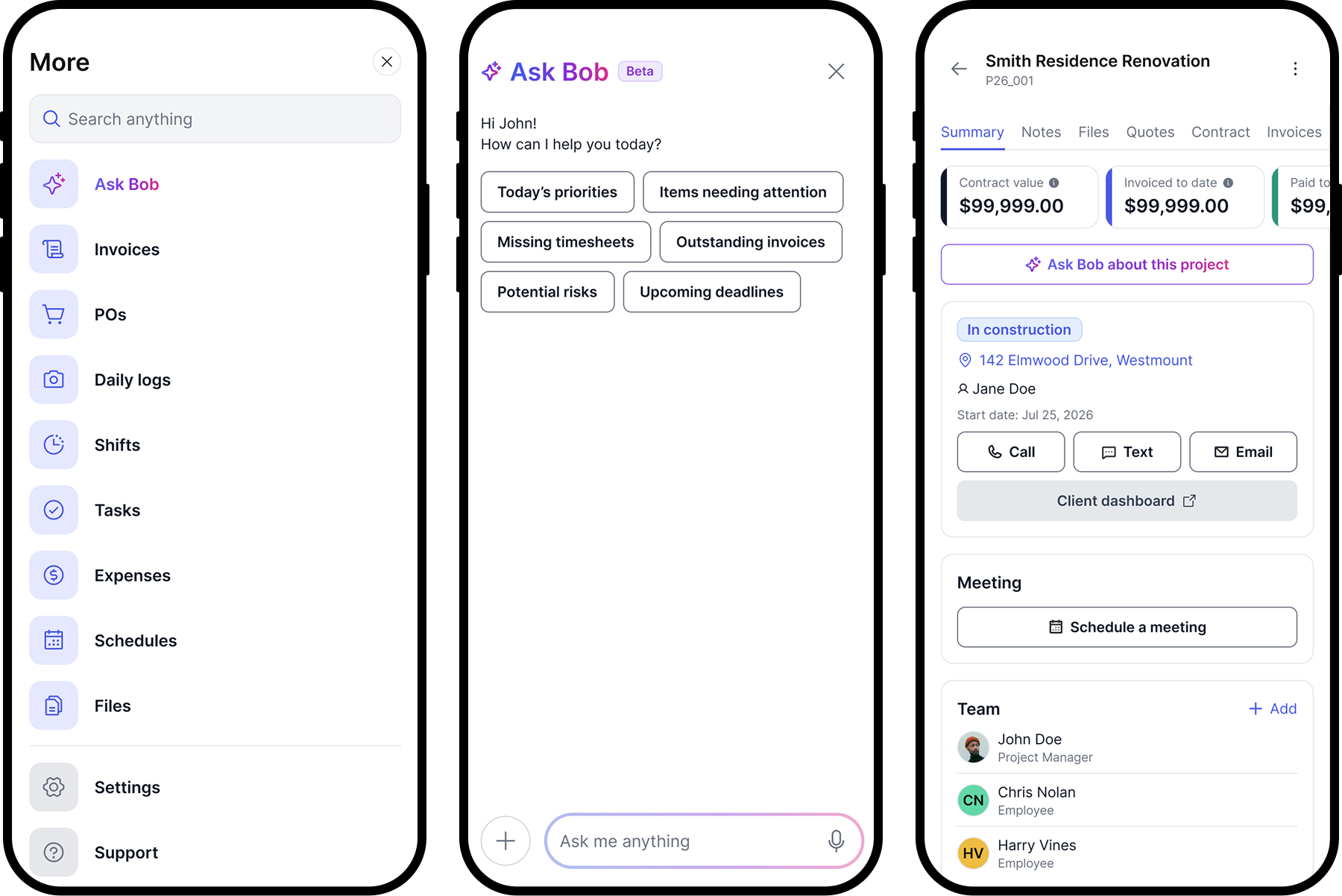
Bob and Billdr's construction-specific mobile navigation, daily logs, shifts, and POs, all in one app.
Billdr wins on construction AI by a significant margin.
monday.com's AI is designed for generic team workflows. Billdr's AI team was built for the specific operational problems that general contractors face every day. For a GC, this comparison is not close.
Best for: GCs who want AI that understands construction estimating, project monitoring, and lead management rather than generic workflow optimization.
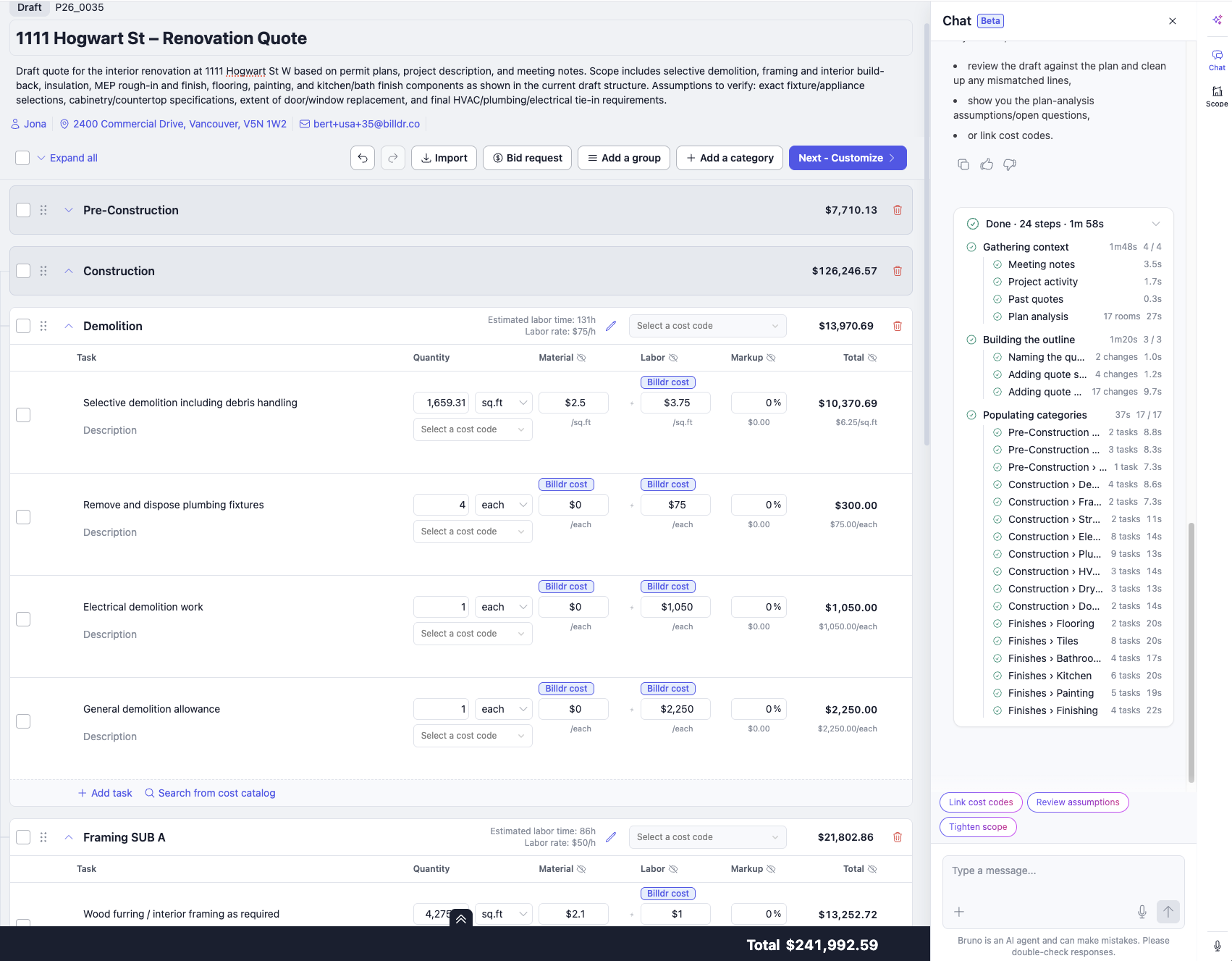
A live estimate in progress: Bruno breaking down demolition, framing, and finishes by cost code and labor rate.
What Does monday.com Actually Get Right?
It is worth being direct about what monday.com does well, because a fair comparison requires acknowledging genuine strengths.
The visual interface is genuinely good. Board views make it easy to see what is happening across a team at a glance. The timeline and Gantt views are well-implemented. Automations are flexible and the 250 to 25,000 actions per month across plans cover most team needs. The integration library is extensive, connecting to hundreds of third-party tools. For a cross-functional business team, these capabilities are valuable.
For a GC who runs a construction business alongside marketing, sales, or operations departments that use monday.com, keeping it for those non-construction workflows makes sense. The mistake is trying to use it for the construction workflow itself, where the missing features, the configuration overhead, and the lack of construction-specific AI create more friction than the platform's flexibility resolves.
monday.com wins on flexibility for non-construction teams.
As a generic work OS, monday.com is well-designed. For GCs who run diverse teams beyond construction, monday.com may serve non-construction departments effectively alongside Billdr for construction project management.
Best for: Cross-functional teams that need a flexible work OS for non-construction workflows, used alongside Billdr for the construction side of the business.
Who Should Use What
monday.com is the right choice if you need a generic, flexible work management platform that your entire organization can use across different functions. If you run a contracting business alongside a sales team, a marketing department, or other non-construction operations that need visual project management, monday.com serves those teams well. If your construction project management needs are light and you are primarily tracking tasks rather than managing full construction workflows, monday.com can work as a starting point.
Billdr is the right choice if you are a general contractor whose primary work is managing construction projects. If you need to estimate jobs, track change orders, generate daily logs, coordinate subcontractors, invoice at milestones, and have an AI team doing parts of that work while you're on site, Billdr was built for exactly that. Every feature in Billdr exists because a GC needed it.
The clearest signal for your decision: if you currently use monday.com for construction management and you are spending time building templates, configuring boards, and working around the limitations of a generic tool, that configuration cost is a signal. Purpose-built construction software exists, and it does not require you to build it yourself. If you are ready to make the switch, Billdr is designed to get a GC operational without a months-long implementation. You can start a free trial at billdr.ai, and if you have active projects in monday.com, your board data can be exported and reorganized into Billdr's project structure in a single afternoon.
Quick Reference: Pros and Cons
Choose Billdr if you...
- Are a general contractor managing construction projects
- Need estimating, change orders, and daily logs built in
- Want AI that understands construction workflows
- Are done configuring generic tools for construction
- Want one platform, not a stack of templates
- Are scaling and need agentic AI operations
Consider monday.com if you...
- Run a cross-functional team across multiple industries
- Need a highly customizable visual work OS
- Already use monday.com for other departments
- Have an IT team to build and maintain workflows
- Manage light project tracking without heavy construction needs
- Need broad integrations with marketing and sales tools
Full Comparison Summary: Billdr vs monday.com
| Feature | Billdr | monday.com |
|---|---|---|
| Platform purpose | ✓ Construction management OS | Generic work management platform |
| Construction estimating | ✓ Bruno AI, scope of work | Not available |
| AI team | ✓ Bob, Bruno, Billie | Generic AI tools only |
| Change orders | ✓ Included | Not available |
| Daily logs | ✓ Built-in, auto client-shared | Not available |
| Milestone invoicing | ✓ Included | Not available |
| Subcontractor management | ✓ Included | Not available |
| Client portal | ✓ Construction progress view | Guest access (limited) |
| Project / task management | ✓ Construction-specific | ✓ Generic visual boards |
| Gantt / timeline | ✓ Included | ✓ Standard and above |
| Automations | ✓ AI Routines, construction-specific | ✓ Configurable (250-25K/mo) |
| Mobile app | ✓ Full platform | ✓ iOS and Android |
| AI for construction | ✓ Purpose-built | No construction AI |
| Setup for construction | ✓ Ready on day one | Significant configuration required |
| Pricing model | Flat CAD, scales by org size | Per seat, CAD, annual billing |
| Starting price | From $180 CAD/mo | Free (2 seats) / $170 CAD for 10 seats (Standard) |
| Construction industry page | ✓ Yes | No dedicated page |
Stop configuring. Start building.
Get started at billdr.aiYes, many GCs do, especially early on. monday.com has templates for construction project tracking and its boards, timelines, and Gantt views are functional for light project management. The limitations become real once you need construction-specific workflows: multi-line estimating from your price book, formal change order tracking, field daily logs that auto-share with clients, milestone-based invoicing, and subcontractor coordination. None of these exist natively in monday.com. They can be approximated with custom setup, but the configuration overhead grows quickly. Most GCs who move to Billdr from monday.com describe the same experience: they spent significant time building a worse version of what Billdr ships on day one.
monday.com has general-purpose AI tools: a Sidekick assistant, AI workflow builder, and meeting notetaker. These are useful for any team managing generic tasks. Billdr's AI team was built specifically for construction operations. Bruno reads your plans, pulls from your actual price book, and generates a detailed multi-line scope of work in minutes. Bob monitors every active project in real time and flags risks before they compound. Billie, coming soon, qualifies inbound leads and books calls automatically. A practical example: if a client texts you a change request at 8pm, monday.com's AI can help summarize that thread. Bruno can look at your price book, calculate the cost of the change, and draft the formal change order for the client to sign. That is the gap between generic AI and construction AI.
There is no native integration between Billdr and monday.com. Billdr is designed as a complete construction operating system so GCs do not need a separate project management tool alongside it. If your business uses monday.com for non-construction departments such as marketing, HR, or sales, those teams can continue using it alongside Billdr for construction. For the construction workflow itself, Billdr replaces monday.com rather than connecting to it.