
Billdr and CompanyCam solve different problems. CompanyCam is a best-in-class photo documentation tool with live AI features including automatic photo tagging, AI captions, and AI-generated daily summaries that Billdr does not currently have. Billdr is a complete construction management platform that includes daily logs and field documentation alongside estimating, project management, invoicing, and an AI team. GCs using CompanyCam still need a separate platform for everything else. GCs using Billdr get documentation built in without a second subscription. There is currently no integration between the two platforms.
CompanyCam has a loyal following among contractors. If you have used it, you know why. It is fast, clean, and purpose-built for capturing what happens on a job site. Photo documentation has always been one of those tasks that falls through the cracks, photos taken on personal phones, stored in camera rolls, shared in text threads, and impossible to find six months later when a client dispute comes up. CompanyCam fixed that.
But here is the question most GCs eventually ask: if you are already running Billdr for your construction business, do you actually need CompanyCam? And if you are currently using CompanyCam, what else are you paying for to run the rest of your operation?
This comparison exists to answer that question directly. CompanyCam and Billdr are not direct competitors. They were built for different purposes. But for a GC evaluating their software stack, the overlap is real and the cost question matters.
Full disclosure: we build Billdr. We created this comparison because GCs regularly ask whether a dedicated photo tool makes sense alongside a full platform, or whether an all-in-one approach covers enough. CompanyCam pricing verified at companycam.com as of July 2026. Billdr Core OS pricing is in CAD. No integration exists between the two platforms. Always request a current demo from both before deciding.
CompanyCam is a photo documentation platform built for contractors. It automatically geotags and timestamps every photo, organizes them by project, and makes them searchable and shareable with clients and team members. It is not a construction management platform. It does not estimate, invoice, schedule projects, or manage financials. It does one thing very well: documentation.
CompanyCam was founded in 2015 in Lincoln, Nebraska, and has grown to serve over 200,000 contractors across roofing, restoration, painting, general contracting, and other trades. Every photo your crew takes is automatically attached to the right project, geotagged, timestamped, and accessible to everyone who needs it.
The platform also includes annotations on photos, before-and-after comparison tools, AI-powered photo tagging, AI-generated captions, checklists, punch lists, and client-sharing capabilities. For a contractor whose primary pain point is jobsite documentation, CompanyCam is genuinely excellent.
The limitation is equally clear: CompanyCam ends at documentation. When you need to estimate a job, invoice a client, schedule a crew, manage change orders, or get a real-time picture of your project financials, you need another platform.
| Feature | Billdr | CompanyCam |
|---|---|---|
| System role | Central operating system (all-in-one) | Point solution (photo documentation) |
| Daily logs | ✓ Full field logs with photos | ✓ Photo-based logs |
| Field markup and annotations | Basic lines, text, and arrows | ✓ Full drawings, overlays, stamps |
| AI capabilities | ✓ Operational AI: Bob, Bruno, Billie | ✓ Visual AI: photo tagging, captions, summaries |
| AI photo tagging | Not available today (roadmap via Bob) | ✓ AI Tags live now |
| AI daily log summaries | Not available today (roadmap via Bob) | ✓ Available now |
| Before/after comparisons | General photo uploads | ✓ Dedicated before/after feature |
| Client photo sharing | ✓ Via client dashboard | ✓ Included |
| Estimating | ✓ Full cost catalog + Bruno AI | Integrates with third-party tools |
| Project management | ✓ Multi-phase, milestone-based | Integrates with third-party tools |
| Invoicing and payments | ✓ Milestone invoicing included | Integrates with third-party tools |
| Standalone complete platform | ✓ Yes, no additional tools needed | Requires PM and accounting software |
| Integration with each other | No Billdr-CompanyCam integration | No CompanyCam-Billdr integration |
CompanyCam is genuinely good at what it does. If your documentation needs are heavy, particularly in roofing or restoration where photo evidence is a daily operational and legal requirement, CompanyCam's depth is hard to match. The gap is everything outside of photos. CompanyCam was never designed to run your construction business. It was designed to document it.
If you only need photo documentation, CompanyCam is one of the best tools available. If you need a complete platform that includes documentation alongside estimating, project management, invoicing, and an AI team, Billdr covers the full scope without a second subscription.
Best for: GCs who want documentation as part of a complete platform, not a standalone tool sitting alongside everything else.
Billdr's daily logs allow field crews to record what happened on site each day: work completed, materials used, crew hours, weather conditions, site notes, and photos attached directly to the project log. Daily logs are shared automatically through the client dashboard, keeping owners informed without manual effort from the GC. This covers the core documentation workflow that most GCs use CompanyCam for, built into the same platform as estimating, scheduling, and invoicing.
When a client disputes a charge, when a sub claims they were not on site, when an inspector asks what was done on a specific day, the daily log is the record that protects you. Billdr's daily logs are built into the platform workflow rather than sitting as a separate step. Field crews log what happened, attach photos, record hours, and note materials directly in the app, automatically attached to the project record and visible to the client through their dashboard. No separate upload. No manual sharing.
Work completed and crew hours logged per day. Materials used, tied to the project cost record. Photos attached directly to the log entry and organized by project. Weather and site conditions. Notes and observations. Client-visible reports shared automatically through the dashboard.
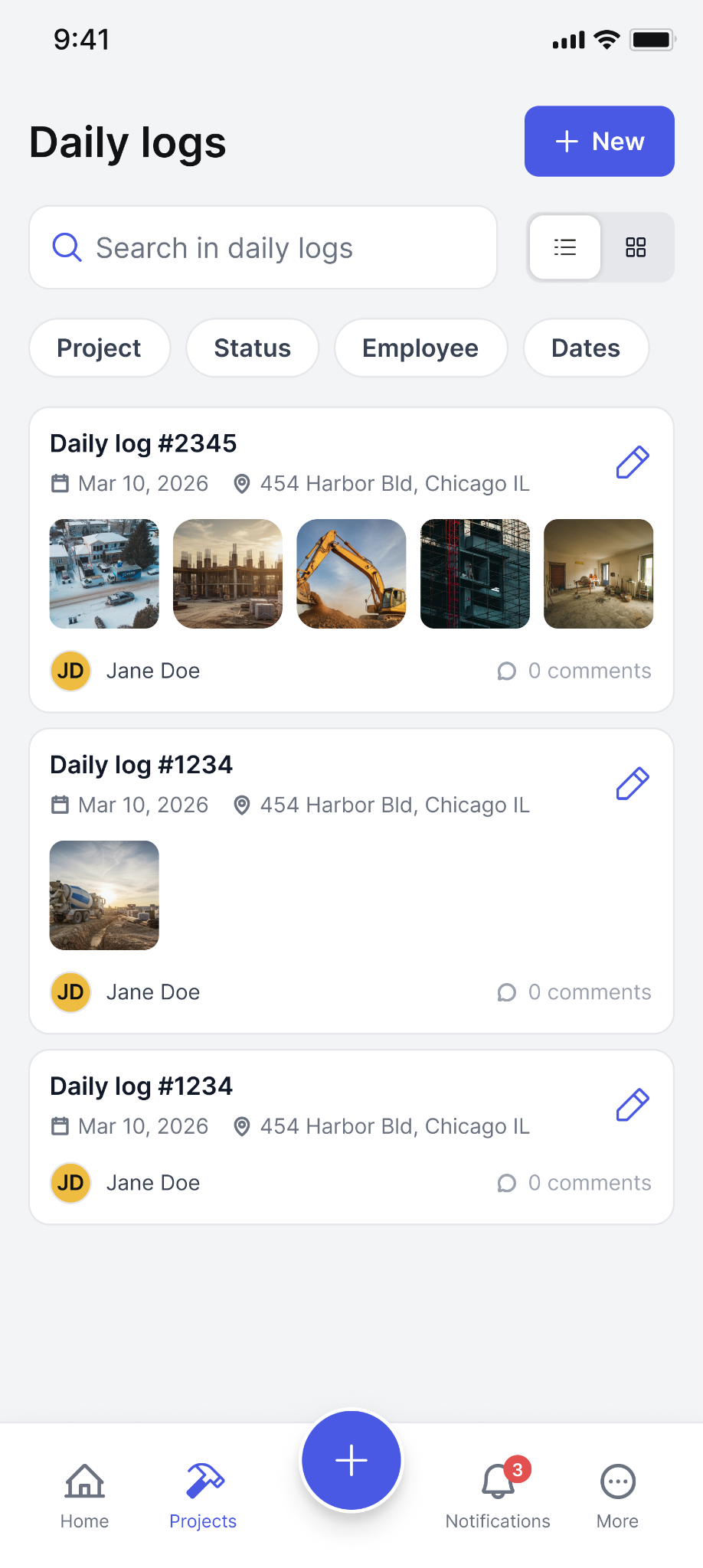
Billdr daily logs: searchable by project, date, employee, and status. Photos attached automatically to each entry.
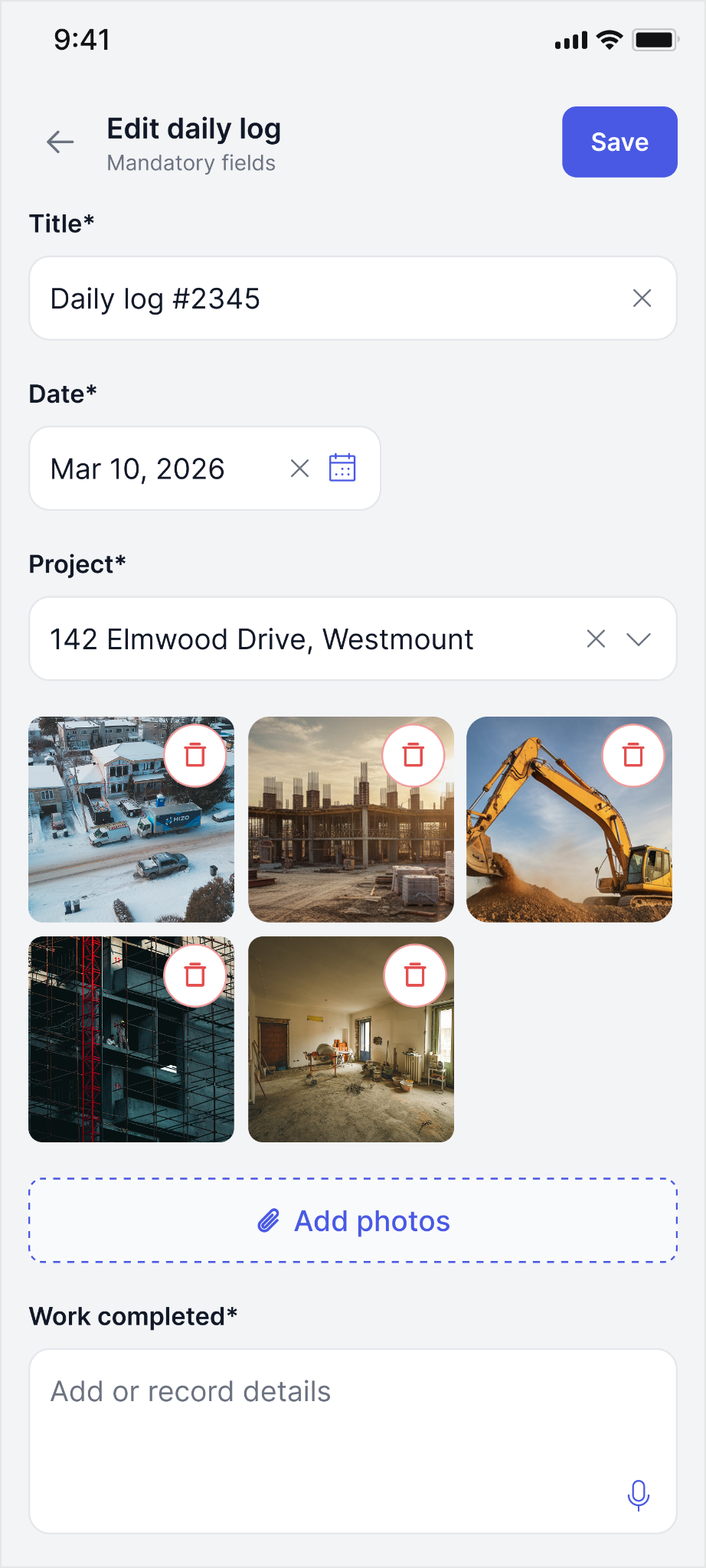
Edit daily log: work completed, photos, missing materials, all in one structured form on mobile.
CompanyCam's AI documentation features are live and battle-tested. AI Tags automatically categorize every photo by trade without anyone labeling them manually. AI captions describe what is in a photo so you can search for it six months later. AI-generated daily log summaries turn photo activity into a readable client report automatically. Photo annotations with arrows, text, and drawings let crews mark up images in ways Billdr does not currently support.
Billdr is developing equivalent capabilities through Bob. AI-generated daily log summaries via Bob Routines are on the roadmap. When they ship, the documentation gap closes significantly. But the honest position today is that CompanyCam's AI photo tools are ahead of where Billdr currently is, and GCs who rely heavily on automated documentation should factor that in.
For GCs who need basic to intermediate documentation, Billdr covers that without a separate subscription. For GCs whose business depends heavily on detailed photo documentation with annotations, AI categorization, and automated summaries, CompanyCam's depth is genuine.
Best for: GCs in roofing, restoration, or insurance work where detailed photo evidence is a daily operational requirement may find CompanyCam worth the additional cost. For most GCs documenting to protect themselves and keep clients informed, Billdr is sufficient.
As of July 2026, CompanyCam has moved to team-based pricing with minimum user commitments. Plans start at $79 per month for up to 3 users on the Pro plan, $129 per month for Premium (3 users), and $199 per month for Elite (3 users). A 10-person team can pay $240 to $490 per month for photo documentation alone, before adding a construction management platform on top. Billdr Core OS includes daily logs and documentation as part of flat pricing starting at $180 CAD per month, with no per-user charge and no minimum user commitment.
GCs using CompanyCam are also paying for a separate construction management platform for estimating, invoicing, and project management. That means two subscriptions, two logins, no sync between them, and two separate places where project information lives.
To understand how the 10-user range is calculated: CompanyCam's plans cover a minimum of 3 users, with additional users billed individually above that threshold. At 10 users, independent reviewers have benchmarked costs between $240 and $490 per month depending on the plan tier and any add-ons. That is more than Billdr's full platform at the Premium tier.
| Setup | CompanyCam cost (USD) | Billdr equivalent (CAD) |
|---|---|---|
| Small team (up to 3 users) | $79/mo Pro, docs only | $180/mo, full platform, unlimited users |
| Mid team (up to 3 users) | $129/mo Premium, docs only | $180/mo, full platform, unlimited users |
| Growing team (10 users) | $240-$490/mo, docs only | $325/mo Premium, full platform |
| + Main platform cost | Add $180-$580/mo for Billdr on top | Included. No second subscription needed. |
CompanyCam's updated pricing makes the two-platform approach significantly more expensive than it once was. A 10-person team could spend more on CompanyCam alone than on Billdr's full platform. Billdr's flat pricing includes documentation alongside everything else a GC needs, with no per-user charge and no minimum commitment.
Best for: GCs who want to reduce their software stack and monthly spend. The tipping point is around 3 or more field users.
Yes. CompanyCam currently has live AI capabilities that Billdr is still developing: AI Tags automatically categorize photos without manual input, AI-generated captions describe photo content, AI daily log summaries generate automatically from photo activity, and smart search lets you find specific photos using natural language. Billdr's AI team (Bob, Bruno, Billie) handles estimating, project monitoring, and lead management, capabilities CompanyCam does not have.
Both platforms have AI in 2026, but they are built for entirely different problems. CompanyCam's AI is documentation-focused and live today. AI Tags scan photos and automatically assign categories like roofing, electrical, interior, or exterior without anyone labeling them manually. Billdr's AI team operates at the operational level. Bob monitors every active project, flags budget risks, and answers questions about your jobs. Bruno builds detailed estimates from your price book in minutes. Billie handles inbound leads and books calls automatically.
| Feature | Billdr | CompanyCam |
|---|---|---|
| AI photo categorization | Not available today (roadmap via Bob) | ✓ AI Tags live now |
| AI photo captions | Not available today (roadmap via Bob) | ✓ AI-generated descriptions live |
| AI daily log summaries | Not available today (roadmap via Bob) | ✓ Available now |
| AI estimating (Bruno) | ✓ Builds from your price book | Not applicable (photo tool) |
| AI project monitoring (Bob) | ✓ Always-on, flags risks | Not applicable (photo tool) |
| AI lead management (Billie) | ~ Coming soon | Not applicable (photo tool) |
| AI smart photo search | Not available today | ✓ Natural language search |
CompanyCam's AI is purpose-built for photo documentation and live today. Billdr's AI team handles estimating, project monitoring, and lead management, capabilities CompanyCam does not have. The documentation AI gap is narrowing as Billdr builds Bob's daily log capabilities.
Best for: GCs who want AI built into their core operations alongside documentation that covers the essential workflow.
Both platforms are mobile-first, but built for different field tasks. CompanyCam's app is purpose-built for photo capture: fast, frictionless, and designed so a crew member can take a geotagged, timestamped photo and attach it to the right project in seconds. Billdr's app covers the full construction workflow: daily logs, schedules, timesheets, invoices, and access to Bob, Bruno, and Billie from your phone.
CompanyCam's mobile app supports offline photo capture, which matters on job sites with poor connectivity. Billdr's mobile app covers the full platform workflow including asking Bob questions, reviewing quotes, and managing project financials. The tradeoff is breadth over speed: doing more things means the individual photo capture experience is less streamlined than CompanyCam's dedicated tool.
| Mobile feature | Billdr | CompanyCam |
|---|---|---|
| Photo capture speed | Standard camera integration | ✓ Purpose-built, frictionless |
| Offline photo capture | Requires connectivity | ✓ Available offline |
| Daily log entry | ✓ Full log with hours, notes, photos | Photo-based logs only |
| Timesheet tracking | ✓ Built-in crew timesheets | Not available |
| Ask Bob / AI copilot | ✓ Full Bob access on mobile | Not available |
| Invoice and financials | ✓ Full access on mobile | Not available |
| Project schedule view | ✓ Full schedule on mobile | Not available |
For crews whose primary job site task is photo documentation, CompanyCam's dedicated app is faster and works offline. For GCs who want their full operational platform in their pocket, Billdr covers significantly more ground.
Best for: Roofing and restoration crews who need fast offline photo capture will appreciate CompanyCam's mobile focus. GCs who need a complete field management tool in their pocket will find Billdr more useful day to day.
| Category | Billdr | CompanyCam |
|---|---|---|
| System role | Central operating system | Field photo documentation |
| Daily logs | ✓ Full field logs with photos | ✓ Photo-based logs |
| Photo annotation | Basic markup tools | ✓ Full drawings and overlays |
| AI photo tools (live today) | Not available today | ✓ AI Tags, captions, summaries |
| AI photo tools (roadmap) | ~ Coming via Bob Routines | Already available |
| Construction estimating | ✓ Bruno AI + cost catalog | Integrates with third-party tools |
| Project management | ✓ Multi-phase, milestone-based | Integrates with third-party tools |
| Invoicing and payments | ✓ Included | Integrates with third-party tools |
| AI team for operations | ✓ Bob, Bruno, Billie | Not applicable (photo tool) |
| Mobile photo capture | Standard integration | ✓ Purpose-built, offline-capable |
| Mobile platform depth | ✓ Full platform on mobile | Photo documentation only |
| Client dashboard | ✓ Full construction progress view | ✓ Photo sharing and reports |
| Pricing model | ✓ Flat CAD rate, no per-user fee | Team-based USD, min 3 users |
| Integration with each other | No integration exists | No integration exists |
| Standalone platform | ✓ Yes | Requires PM and accounting tools |
CompanyCam is worth the investment if your documentation needs are heavy and specific. Roofing contractors managing insurance claims need timestamped photo evidence for every job. Restoration contractors dealing with before-and-after documentation need side-by-side comparison tools. If photo documentation is a daily legal and operational requirement for your type of work, CompanyCam's AI photo tools and dedicated mobile app are genuinely ahead of where Billdr is today.
For most general contractors, renovation contractors, and custom home builders, Billdr's built-in documentation is enough. Daily logs, project photos, and client-facing reports cover the essential workflow without requiring a second subscription to a tool that does not connect to the rest of your platform. And with CompanyCam's updated pricing requiring minimum user commitments, the cost of running two separate platforms has grown significantly.
The clearest signal for your decision: if you are currently using CompanyCam alongside another construction management platform, ask whether the two tools actually talk to each other. If they do not, you are managing two separate data environments and paying for both. Billdr consolidates that into one.
There are cases where using both makes sense, at least temporarily. Restoration and roofing contractors with insurance claim workflows that depend on detailed photo evidence often keep CompanyCam even after adopting a full platform, because the depth of photo annotation and AI tagging is purpose-built for that use case. For most renovation GCs and custom home builders, Billdr's daily log photos are sufficient and the cost of a second subscription is hard to justify.
Here is the simplest decision framework: if photo documentation is your primary daily operational need and your business depends on photo evidence for claims, annotations, or compliance, start with CompanyCam and add a construction management platform around it. If you need to run a complete construction business and documentation is one piece of that, start with Billdr and let the daily logs handle what most GCs actually need from a photo tool.
- Need a complete construction platform
- Want estimating, invoicing, and PM in one place
- Have 3 or more field users
- Want daily logs without a second subscription
- Want an AI team for operations (Bob, Bruno, Billie)
- Want flat pricing that does not scale with team size
- Need best-in-class photo documentation
- Work in roofing, restoration, or insurance claims
- Depend on photo evidence for compliance
- Need offline photo capture in the field
- Want AI photo tagging and summaries today
- Already have a construction platform you like
One platform. Daily logs, AI team, and everything else your construction business needs.
Get started at billdr.aiNo. There is currently no integration between Billdr and CompanyCam. Photos taken in CompanyCam do not sync to Billdr project records, and daily logs in Billdr do not connect to CompanyCam. GCs who want to use both platforms would manage them as two entirely separate systems.
Yes. Billdr includes daily logs as a built-in feature. Field crews can log work completed, crew hours, materials used, weather conditions, site notes, and attach photos directly to the project record. Daily logs are shared automatically through the client dashboard. AI-generated daily log summaries through Bob are on the roadmap.
No. CompanyCam is a photo documentation tool, not a construction management platform. It does not include estimating, project management, scheduling, invoicing, job costing, change order management, or financial reporting. GCs using CompanyCam still need a separate platform for all of those functions. Billdr covers both documentation and the full construction management workflow in one platform.
Yes. CompanyCam has AI Tags that automatically categorize photos, AI-generated captions, AI daily log summaries, and smart search using natural language. Billdr's AI team (Bob, Bruno, Billie) covers operational capabilities like estimating, project monitoring, and lead management, with AI documentation features on the roadmap via Bob.
CompanyCam has moved to team-based pricing with minimum user commitments. Plans start at $79/mo for up to 3 users (Pro), $129/mo for Premium, and $199/mo for Elite. A 10-person team can pay $240 to $490 per month for photo documentation alone. Billdr Core OS starts at $180 CAD/mo with no per-user charge, covering daily logs, estimating, project management, invoicing, and AI team starter tokens.
For fast, frictionless photo capture that works offline, CompanyCam's dedicated mobile app is purpose-built and excellent. For crews who need to log hours, track materials, view schedules, and interact with the full platform from their phone, Billdr's mobile app covers more ground. Most GCs find that Billdr's daily log feature handles their crew's primary field tasks without a second tool.